
Opsgenie migration checklist: what to move before 5 April 2027
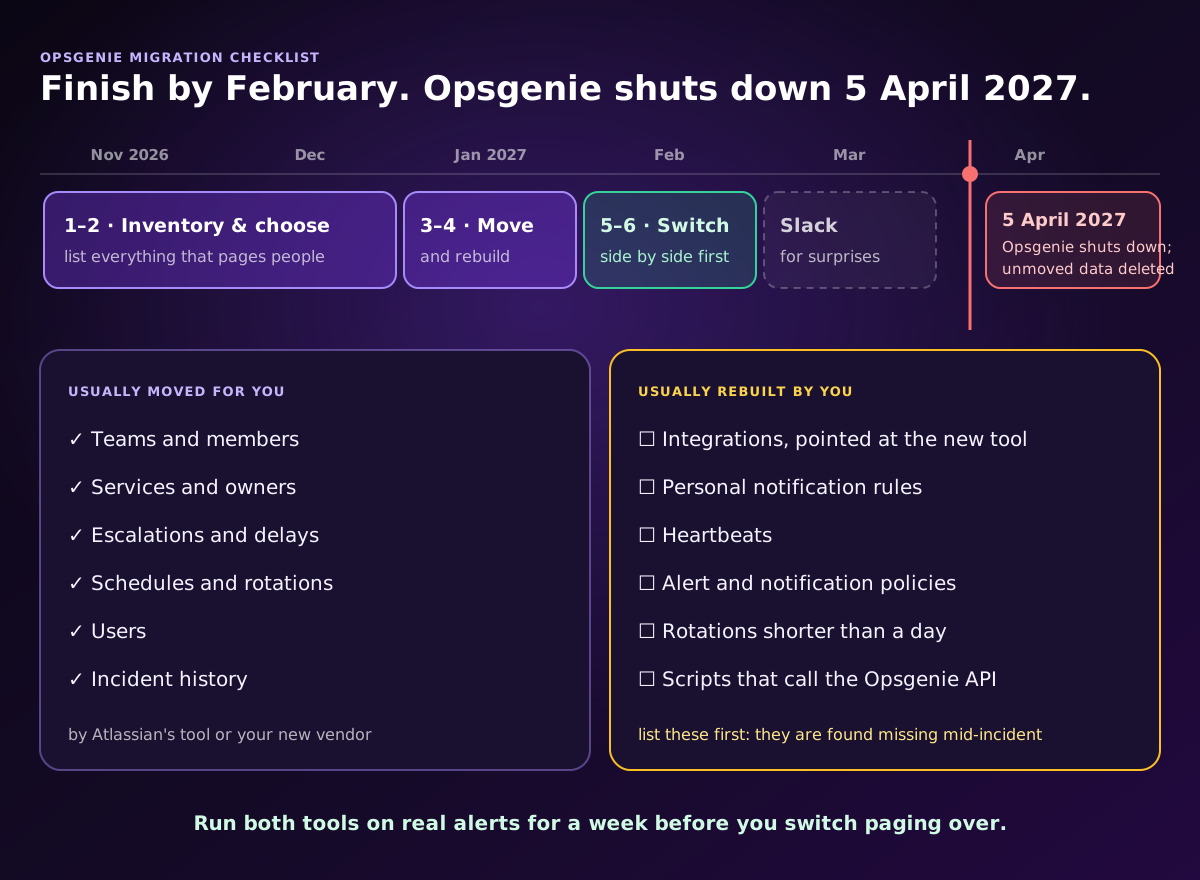
To migrate off Opsgenie, inventory everything that pages people, move the configuration, rebuild the parts that never move automatically, run the new tool alongside Opsgenie on real alerts, and switch paging over service by service. Atlassian shuts Opsgenie down on 5 April 2027 and deletes any data that has not been moved, so the safe target is to finish by the end of February 2027, leaving five weeks of slack.
This checklist works whichever tool you pick. If you are still choosing, read the best Opsgenie alternatives first.
Disclosure: we make Oppex, one of the destinations. Atlassian dates are from Atlassian's own Opsgenie announcements, November 2026.
Key dates
| Date | What happens |
|---|---|
| 4 June 2025 | Opsgenie end of sale: no new customers, and editions can no longer be changed |
| Now – 5 April 2027 | Opsgenie keeps working; renewals are allowed for terms that end before the shutdown |
| 5 April 2027 | Opsgenie shuts down; data that has not been migrated is deleted |
Atlassian's own migration tool moves data only to its cloud products, Jira Service Management and Compass. If you run Jira Service Management Data Center, Atlassian asks you to move that instance to the cloud first.
Step 1: Inventory everything that pages people
Export or list each of these from Opsgenie before you change anything. The last four are the ones teams most often find missing after the switch.
- Teams and their members
- Services and which team owns each one
- Escalations: every rule, its order, delays and repeats
- Schedules: rotations, participants, overrides and time restrictions, including any rotation shorter than a day
- Users, including former employees still named in a schedule or escalation
- Incident and alert history you need to keep for postmortems or audits
- Integrations: every monitoring tool that sends alerts, and every outbound action to Slack, Jira or a ticketing tool
- Heartbeats that page when a job stops checking in
- Alert and notification policies that drop, delay or change alerts
- Scripts and pipelines that call the Opsgenie API, such as a deploy job that creates an alert or a bot that checks who is on call
Step 2: Choose where to go
Atlassian points customers to Jira Service Management or Compass. If you used Opsgenie only for engineering on-call, a dedicated incident management tool usually fits better than a service desk. How the options compare.
Step 3: Move the configuration
- To Jira Service Management or Compass: use Atlassian's in-app migration tool. Atlassian says most data moves automatically.
- To another tool: ask the vendor what its migration covers. The Oppex team, for example, moves your Opsgenie teams, services, escalations, schedules, users and incident history within about 24 hours of receiving a read-only Opsgenie API key (what is migrated).
- Tell the vendor early if your account is in the EU, or if your Opsgenie data already lives inside Jira Service Management: both use a different API address.
Whichever route you take, ask for a written list of what did not move.
Step 4: Rebuild what never moves automatically
- Point every monitoring tool at the new tool. Each service gets a new endpoint or integration key in the new tool, and nothing reaches it until each integration is changed.
- Have every person set how they are paged: phone number, consent for calls and SMS, and which methods they want. Personal notification rules do not carry over.
- Recreate heartbeats and alert policies as the new tool's equivalents, or replace them with its noise reduction.
- Decide what to do with very short rotations. Some tools support only daily, weekly or monthly rotations.
- Repoint every script that called the Opsgenie API.
- Assign owners for each service in the new tool.
Step 5: Run both tools side by side
Send every alert to both Opsgenie and the new tool for at least a week, with Opsgenie still paging. Compare which alerts each one raised, check every escalation path, and place a test page to each on-call engineer by phone call and SMS. In Oppex this is shadow mode: it receives a copy of every alert and pages nobody until you say so.
Step 6: Switch paging over, service by service
Move your quietest services first and your most critical last. After each one, confirm a real or test alert reaches the right person. When every service is moved, remove the integrations and delete the API keys that still point at Opsgenie.
A timeline that finishes early
| When | Do this |
|---|---|
| November – December 2026 | Inventory (step 1) and choose the destination (step 2) |
| January 2027 | Move the configuration and rebuild what does not move (steps 3 and 4) |
| February 2027 | Run side by side, then switch over service by service (steps 5 and 6) |
| March 2027 | Slack for surprises; Opsgenie off for good |
| 5 April 2027 | Opsgenie shuts down |
If you start later, compress the first two rows, not the parallel run: the week of side-by-side alerts is what tells you nothing was missed.
For the side-by-side numbers on Jira Service Management and Oppex, read Opsgenie sunsets 5th April 2027: upgrade to Oppex.
Frequently asked questions
How do I migrate off Opsgenie?
Inventory your teams, schedules, escalations, integrations, heartbeats and anything that calls the Opsgenie API; choose the destination; move the setup with Atlassian's in-app tool or the new vendor's migration; rebuild what does not move, such as integrations and personal notification rules; run the new tool alongside Opsgenie on real alerts; then switch paging over service by service, well before Opsgenie shuts down on 5 April 2027.
What happens to Opsgenie data after 5 April 2027?
Atlassian says Opsgenie shuts down on 5 April 2027 and any data that has not been migrated by then is deleted. New Opsgenie sales ended on 4 June 2025; existing subscriptions can still be renewed for terms that end before the shutdown.
What does not move automatically when you leave Opsgenie?
Usually the integrations themselves, because every monitoring tool has to be pointed at the new tool's own endpoint or key, plus each person's notification rules, heartbeats, alert and notification policies, very short rotations, and any script that calls the Opsgenie API. List them before you start so nothing is found missing during an incident.
How long does an Opsgenie migration take?
Moving the configuration is fast: Atlassian's in-app tool moves most data to Jira Service Management automatically, and the Oppex team moves an Opsgenie account to Oppex within about 24 hours of receiving access. Plan four to six weeks in total, because the parallel run on real alerts and the per-service switch-over take most of the time.