
Incident management from Claude Code: an MCP server for on-call
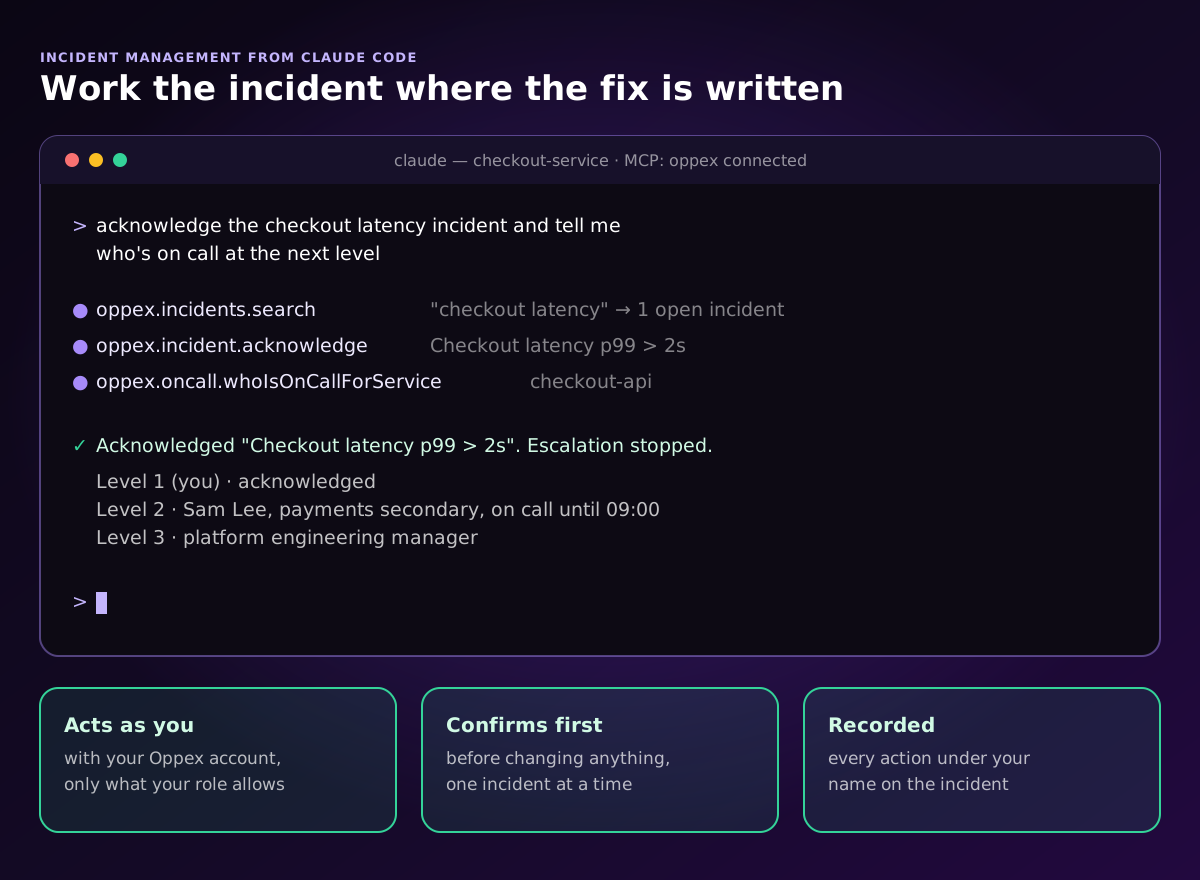
Yes: with an MCP server, Claude Code can work your incidents for you. The Oppex MCP server lets an engineer ask, in plain language from the terminal, "what's assigned to me?", "acknowledge the checkout latency incident and tell me who's on call at the next level", or "resolve it with an RCA based on what we fixed today", and the assistant does it with the engineer's own Oppex account.
What MCP is, and why it matters for incidents
MCP (Model Context Protocol) is the standard that AI assistants such as Claude Code use to connect to other products. An incident tool with an MCP server gives the assistant a set of tools, such as acknowledge an incident or find who is on call, and the assistant picks the right ones for each request.
For incidents this matters because the fix usually happens in the editor or the terminal. An engineer who has just rolled back a bad deploy in Claude Code can acknowledge the incident, write the root cause analysis from what changed, and hand over to the next person without opening another tab.
What an assistant can do in Oppex
| Area | What you can ask for |
|---|---|
| Incidents | List incidents assigned to you or in the workspace, search by title, acknowledge, snooze, resolve, add and read notes |
| Root cause analysis | Write an RCA and resolve, or add or update an RCA by the Oppex ID or the monitoring tool's alert ID |
| AI analysis | Read the Oppex AI analysis of an incident and the logs behind it |
| On-call | See who is on call now at each level of a service, or what a person is on call for |
| People (administrators) | List users and workspaces, invite someone, add or remove them from a workspace, or deactivate an account |
| Settings | Read a workspace setting, such as whether an RCA is required to resolve |
One prompt can chain several tools. "Take over the checkout latency incident: summarize the notes and the AI analysis, then add a note that I'm on it" searches the incident, reads its notes and analysis, and adds the note. Every tool, with example prompts.
What to look for in any incident MCP server
An assistant that can resolve incidents needs the same guardrails as a person who can. Check these before you connect one:
- It acts as the engineer, not as a shared key. Sign-in should go through the tool's own login, and the assistant should only be able to do what that person's role allows.
- It confirms before it changes anything, unless the prompt already named the action and the incident.
- It works one incident at a time. A request that covers many incidents should list them and ask before acting on each.
- Every action is recorded under the engineer's name, so the incident timeline shows who did what.
- It is clear about what it cannot do. In Oppex, the assistant cannot create incidents, reassign or escalate them, or change services, schedules, escalation policies or settings.
The Oppex MCP server follows all five.
Set it up in Claude Code
-
An administrator turns it on once for the organization: Settings → Organization → Preferences → MCP Server → Enable.
-
Each engineer copies the command from Settings → Personal → MCP Server and runs it in a terminal. It has this form:
claude mcp add --transport http --client-id <your-client-id> oppex https://mcp-server.oppex.ai/mcp -
Start Claude Code, type
/mcp, select oppex, sign in to Oppex in the browser and click Authorize.
Each connection works in the workspace that was active in Oppex when you authorized it; to use another one, switch workspace in Oppex and reconnect. The full guide, with screenshots, is in Working with Oppex MCP Server.
The Oppex MCP server is included from the Growth plan, at $12 per user per month (pricing), and also works with Codex and Cursor.
Where it fits in an incident
- During the incident: acknowledge from the terminal, read the AI analysis, check who is on call at the next level, and leave notes as you go.
- After the fix: ask the assistant to write the root cause analysis from what you changed, and resolve the incident with it.
- At handover: "What am I on call for this week, and what's still open?"
Frequently asked questions
Is there an MCP server for incident management that works with Claude Code?
Yes. The Oppex MCP server connects Claude Code to Oppex, so engineers can list, search, acknowledge, snooze and resolve incidents, read and add notes, read the AI analysis, write the root cause analysis and check who is on call, in plain language from the terminal. It is included from the Oppex Growth plan.
What can an AI assistant do in an incident tool through MCP?
Through the Oppex MCP server an assistant can work on incidents (list, search, acknowledge, snooze, resolve, add notes, read the AI analysis, write or update the RCA), look up on-call (who is on call for a service or for a person), and, for administrators, list, invite, add, remove or deactivate users. It cannot create incidents or change services, schedules, escalation policies or settings.
Is it safe to let an AI assistant acknowledge or resolve incidents?
It is when the server acts with the engineer's own account and role, confirms before changing anything, works on one incident at a time, and records every action under the engineer's name. Those are the rules the Oppex MCP server follows, and the assistant cannot do anything the engineer's role does not allow.